


Sell books with World of Books
4.2913.00 Reviews
App Specs
- Version
- 6.9.0 (#16985)
- Updated On
- License
- Free
- Downloads
- 100,000+
- Developer
- World of Books
- Categories
- Lifestyle
- Platform
- Android
Screenshots


 Analysis by AppCompare
I approached Sell books with World of Books as a practical lifestyle app rather than a general reading platform. Its purpose is focused: helping people turn unwanted books and textbooks into a selling task they can manage from a phone. That narrow aim is useful because the experience does not need to compete with e-readers, library apps, or book-discovery services. Instead, it is most valuable when a shelf is crowded, a course has finished, or a household needs a straightforward way to sort books that are no longer being used.
The app comes from World of Books, and it is free to use. It sits in an interesting middle ground between a traditional second-hand shop and a manual marketplace listing. I found that distinction important. A person who wants to photograph every angle, negotiate with buyers, and write a custom description may prefer a peer-to-peer marketplace. Someone who wants less conversation and a more guided selling process may find this app easier to approach.
It is listed as a Lifestyle app for everyone, and its overall reception is encouraging, with an average of 4.2 from around 1.6 thousand ratings. It has passed the 100 thousand install mark, which suggests that it has found a real audience without making the experience feel like a noisy social network. The app first appeared on June 12, 2019, and version 6.9.0, build 16985, is the current release. I would still treat the version number as a maintenance detail rather than a reason to install it: the useful question is whether its selling flow suits the way you handle books.
How the experience works for different people and situations
When I think about who will find this process comfortable, I look beyond how many books they own and consider what makes selling feel difficult: travel, buyer messages, sorting, or simply getting started. A small, clearly chosen batch can make the first attempt feel manageable, while a mixed collection may call for more preparation. The next section turns that difference into practical choices for common selling situations.
Readable screens and a navigation style that stays focused
The strongest accessibility quality here is its limited scope. When an app has one clear job, it is easier to understand what to do next. I did not approach it as a place to browse endlessly; I used it as a task-based tool, moving from deciding what to sell toward identifying the item and completing the relevant steps. That makes it more approachable for someone who becomes overwhelmed by crowded menus or too many unrelated services.
For a first-time seller, the most helpful habit is to prepare the books before opening the app. Put textbooks in one pile, ordinary novels in another, and keep editions that look similar apart from one another. Check the cover, title page, and any visible identifying details first. This reduces the amount of back-and-forth needed on a small phone screen and makes the identification stage less tiring.
I also recommend working in short batches rather than treating an entire bookcase as one job. A batch of several similar items is easier to track mentally, while a huge unsorted pile increases the chance of scanning or selecting the wrong edition. This is a small workflow improvement, but it matters for people with attention difficulties, limited energy, or a tendency to abandon tasks once too many decisions appear at once.
Worth Reading Before You Choose

Flipboard Shows What News Apps Must Do Beyond the Feed

Switching to Android Auto Means Rethinking Your Driving Routine

Google Calendar Makes a Crowded Week Easier to Manage

Ludo King Makes the Most of the Minutes Between Plans

Baby Panda World Brings Quick Play to Modern Phones, but Its Game Library Feels Busy

ESPN’s Live Game View Makes Following Close Games Easier
The app is more comfortable for someone who appreciates a guided process than for someone who wants complete control over presentation. In a normal marketplace, I can choose my own headline, write a detailed condition report, add photographs, and answer questions from individual buyers. Here, the appeal is the reduction of those responsibilities. The trade-off is that the experience may feel less expressive and less flexible if every book has a complicated history or unusual condition.
Textbooks deserve particular care. Before submitting one, I would compare the exact title and edition information rather than relying only on a familiar cover. Different editions can look almost identical while being poor substitutes for one another. This is one of the most useful ways to avoid a frustrating outcome: slow down at identification, even if the rest of the process feels quick.
Motor and sensory considerations during a selling task
A phone-based book-selling workflow can be convenient for people who cannot comfortably carry a large stack to a physical shop. I can sort items at home, pause between steps, and deal with the task beside the shelf where the books already are. That is a meaningful advantage for anyone with limited stamina, restricted mobility, or difficulty making repeated trips outside.
At the same time, the physical part has not disappeared. Books still need to be lifted, separated, checked, and packed. A user with hand pain or reduced grip strength may find the app manageable but the preparation more demanding. I would suggest placing a chair near the bookcase, working with a small stack, and asking another person to handle heavier boxes. The digital interface can remove travel, but it cannot remove the weight of the items.
People with visual fatigue may also benefit from a slower rhythm. Book covers can contain small text, similar colours, and edition details that are easy to confuse when the lighting is poor. I would use a bright, even lamp and keep the physical book close rather than trying to identify it from across a room. If reading small print on a phone is difficult, the process may be more comfortable with the device positioned on a stable surface instead of held continuously.
For users who rely on touch accuracy, the practical challenge is not only tapping buttons. It is preventing mistakes while handling a physical object at the same time. Put the phone down before picking up the next book, and keep identified items in a separate pile. That simple separation makes the workflow less dependent on quick hand movements and reduces the risk of losing track of which item has already been processed.
Sensory preferences can influence the choice between this app and a local shop. A home-based process avoids a busy counter, travel noise, and the pressure of speaking to staff while making decisions. On the other hand, a person who finds screens, repeated prompts, or close visual checking tiring may prefer to take a small number of books to a physical buyer and finish the interaction in one visit.
Using it when time, space, or energy is limited
The most realistic everyday use is a household clear-out. Imagine moving to a smaller room, discovering a box of old novels, and finding several course books that are no longer needed. Rather than listing each item separately, I would first divide them by type, identify the obvious candidates, and use the app during a quiet evening. The main benefit is not speed alone; it is turning an indistinct chore into a sequence that can be paused.
Students can use the same approach after a term ends, especially when textbooks are taking up valuable desk space. I would not wait until moving day. Identify books while notes and course materials are still familiar, and keep the ones that may be needed for future study apart from those that are genuinely finished with. This avoids the common mistake of selling a book and later discovering that it is still useful for a related class.
Families may find the app helpful after a child outgrows a reading stage. In that situation, sorting by condition is more important than simply counting the books. Keep damaged or heavily marked copies separate from clean ones, and inspect books that have names, stickers, or writing inside. A guided selling service can reduce the need to negotiate with several buyers, but it does not make honest preparation unnecessary.
For someone with an irregular schedule, the ability to work in small sessions is a practical strength. I could identify a few books one day, continue later, and pack only after the group was ready. This is preferable to a marketplace workflow that may require frequent replies to interested people. If you are selling because you need the money quickly, however, you should compare the convenience of this route with a local shop or direct sale, since the easiest process is not always the fastest way to complete the whole transaction.
The app is also useful for people who dislike arranging meetings with strangers. A direct marketplace can produce a better price in some cases, but it demands messages, scheduling, and judgement about buyers. World of Books offers a more contained alternative for users who value privacy and predictability over maximum control. That is a genuine trade-off rather than a flaw: convenience has value, but it may come with less room to set personal terms.
Where the experience still creates barriers
The biggest barrier is the gap between a simple digital task and the decisions behind it. Selling books is not just pressing through screens. I still need to know which copies are mine to sell, whether an edition is correct, whether its condition is acceptable, and whether sending it away is worthwhile. Users who expect the app to make every judgement for them may be disappointed.
Another limitation is that a phone cannot fully replace a larger view when dealing with a substantial collection. A person with limited vision, reduced concentration, or difficulty switching between physical and digital information may find it tiring to inspect one book, look at the screen, and then repeat the sequence. A table, good lighting, and a written sorting plan make a noticeable difference.
The app may also be a poor fit for sellers who care deeply about individual presentation. Collectible editions, signed copies, books with unusual artwork, and items whose value depends on detailed photographs are better suited to a specialist marketplace. A service designed to make ordinary book selling easier is not automatically the right place for rare or highly personal items.
People who need a completely offline workflow should think carefully before starting. The experience is built around using a phone, so someone who struggles with connectivity, app navigation, or digital forms may need assistance from a friend or family member. I would help by preparing a clear pile and keeping a written record of titles, rather than taking over the whole process. That preserves the user’s control while removing the most frustrating parts.
There is also a psychological barrier that is easy to overlook. A shelf of books can carry memories, and deciding what to sell may be harder than identifying the items. The app is practical, not sentimental. I would make a separate “decide later” pile and avoid forcing an immediate choice on books connected to important events. This keeps the selling task from becoming an emotional clear-out that feels rushed.
What it does better than familiar alternatives
Compared with a local bookshop, the app offers more flexibility around when the work begins. I can sort books at home instead of transporting everything before knowing what will happen. A shop may be better for an immediate conversation, quick clarification, or a small number of items that are easy to carry. The app becomes more attractive when travel is difficult or the collection is spread through the home.
Compared with a peer-to-peer marketplace, it removes much of the social workload. I do not need to create a polished listing for every title or arrange a meeting with each buyer. That is especially useful for people who find messaging stressful, who have limited time, or who want to avoid sharing personal details with strangers. The downside is reduced control over the sales presentation and less opportunity to negotiate item by item.
Compared with simply donating books, selling introduces another decision: is the financial return worth the preparation and packing? For common paperbacks in modest condition, donation may be the kinder and simpler option if the main goal is to clear space. For textbooks or a larger group of suitable books, the app gives the collection a chance to return some value. I would choose based on effort, condition, and urgency rather than assuming every book should be sold.
One of the app’s less obvious strengths is that it encourages a more deliberate inventory. Even if the final result is not perfect for every item, identifying what you own can reveal duplicate copies, forgotten study materials, and books that should be kept. The process works best when I treat it as a small household-management project rather than a race to empty a shelf.
Who should use it, and who should choose another route
I would recommend it to readers clearing a moderate collection, students finished with course books, families sorting children’s shelves, and anyone who wants a less conversational alternative to direct selling. It is particularly suitable when avoiding travel or buyer negotiations matters more than achieving the highest possible return.
I would be more cautious if you have rare editions, specialist knowledge, or a strong need to control the asking price. A collector-focused service or direct marketplace can be better in those cases because detailed descriptions and photographs may influence the outcome. I would also choose a local option when immediate completion is the priority or when handling the books digitally feels more difficult than carrying them to a shop.
The age rating of Everyone makes the app approachable for a broad household audience, but that does not mean every part of selling is equally easy for every person. A child may help sort books, while an adult should handle decisions about ownership, condition, packing, and any transaction details. The app’s broad audience label describes who can use it, not who should make every decision.
My inclusive verdict after using the selling workflow
My view is that Sell books with World of Books succeeds because it narrows a potentially awkward chore into a phone-based process. Its best accessibility quality is practical: I can work at home, pause when tired, avoid a crowded shop, and reduce the amount of direct negotiation. Those benefits matter to people with different mobility, sensory, attention, and scheduling needs, even though the physical sorting and careful identification still require effort.
I would not call it a universal answer for every kind of book. It is less convincing for rare items, highly personalised sales, urgent cash needs, or anyone who wants complete control over each listing. The app is strongest when the priority is lowering the friction of ordinary book selling, not maximising every possible outcome.
As a free Lifestyle app from World of Books, it is easy to justify trying when you have a clear group of unwanted books ready to sort. My advice is to begin with a small, well-lit batch, separate textbooks from general reading, verify editions carefully, and keep uncertain items aside. That method gives the app a fair test without turning a simple clear-out into a stressful project. For the right user, it is a calmer alternative to listing everything manually; for specialist sellers, a more flexible marketplace will remain the better choice.
Pros
- Supports sustainable book reuse by giving pre-owned titles a second life.
- Large catalog makes it easy to discover books across many genres.
- Useful search and filtering tools help narrow down available editions.
- Competitive prices can make reading more affordable than buying new.
- Convenient delivery options simplify ordering books from home.
Cons
- Book condition may vary
- so copies can show noticeable signs of previous use.
- Some popular titles or editions may sell out quickly.
- Delivery times can differ depending on stock location and availability.
- International shipping may be limited or add significant extra costs.
- The app may not offer every feature available on the full website.
FAQs for Sell books with World of Books
What is Sell books with World of Books?
Sell books with World of Books is a service that lets you turn unwanted books into cash by checking their value and sending eligible titles to World of Books. The process is designed to be straightforward: identify your books, review the offered prices, package the accepted items, and arrange delivery according to the service’s current instructions. Availability and exact steps may vary by location.
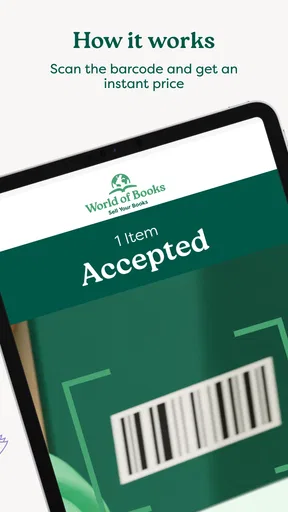
How do I find out how much my books are worth?
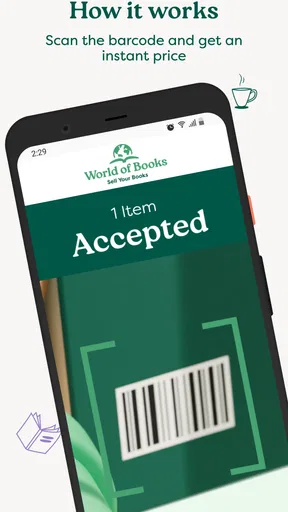
To check a book’s value, you generally need to provide identifying information such as its ISBN, barcode, title, or edition details. The service then matches the book against its current buying database and displays an offer when the title is accepted. Prices can differ significantly depending on demand, condition, edition, and stock levels, so the amount shown is not necessarily the original purchase price.
What condition do books need to be in before I sell them?
Books normally need to be complete, readable, and suitable for resale. Heavy water damage, missing pages, strong odors, excessive writing, severe cover damage, or other major defects may cause a book to be rejected or result in a changed valuation. Before sending anything, inspect each copy carefully and make sure the edition and barcode match the information used to request the offer.
How are books sent to World of Books, and is postage free?
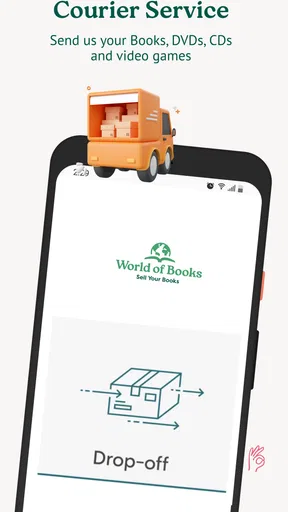
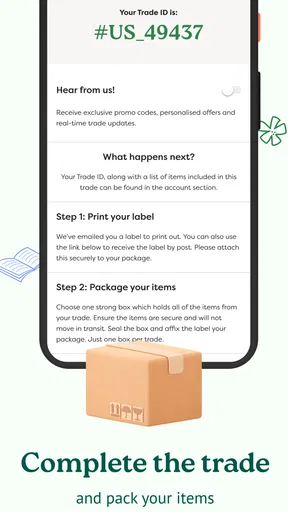
After accepting offers, you usually package the books securely and follow the available shipping instructions provided by World of Books. Whether postage is free, subsidized, or dependent on the size of the shipment can vary according to the country, current promotion, and the service’s terms. Always check the final delivery instructions before dispatching your parcel, especially if tracking or collection is required.
When and how will I receive payment for my books?
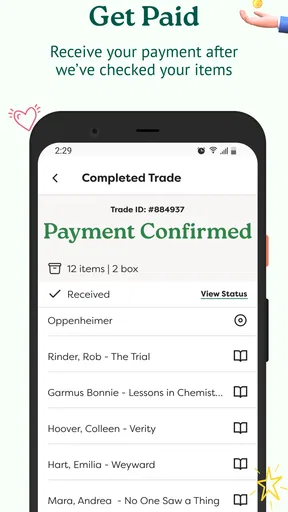
Payment is generally made after World of Books receives and checks the shipment, rather than immediately when an offer is created. The final amount may depend on whether the books match the submitted details and meet the condition requirements. Processing times and payment methods can vary by region, so review the current terms carefully and keep your shipping confirmation until the transaction is completed.


